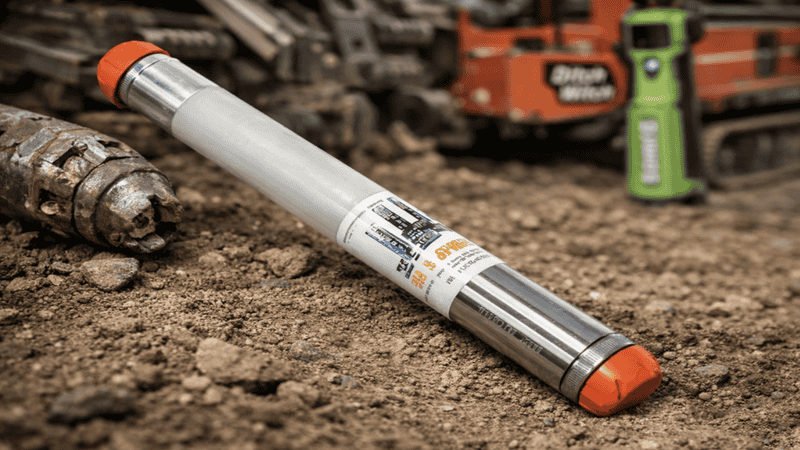
On a drilling crew, a “beacon” is the transmitter you track. In the Ditch Witch world, Subsite is the electronic locating and guidance system side. A Subsite beacon (often called a beacon transmitter or sonde) is the signal source that a compatible tracker reads to guide an HDD bore—or to locate a transmitter moving through pipe and conduit during utility work.
Contractors typically use beacons in two ways:
- HDD guidance (walkover drilling): the beacon sits in the drill head housing and sends steering and status data to the tracker.
- Utility locating: the beacon rides a snake, flex rod, or similar push tool inside pipe or conduit so a receiver can find it in beacon mode.
This guide explains what Subsite beacons do, the main types you’ll see in the field, and where each one fits. If you’re buying, replacing, or matching a beacon to your system, UCG HDD sells Ditch Witch Subsite beacon transmitters and can help confirm compatibility on ucghdd.com.
What a Subsite beacon is?
A Subsite beacon is a rugged electronic transmitter built to be detected by a compatible locator. In HDD guidance, it does more than send a simple signal. Subsite describes its HDD beacons as transmitters that send roll angle, pitch, temperature, and battery status information to the tracker. That’s the core data a crew uses to steer and to watch the health of the transmitter during the bore.
In utility locating, the beacon still acts as a transmitter, but the goal changes. You attach the beacon to a plumber’s snake or flex rod, insert it into the pipe, and move it through the line. Then you locate it from the surface using a compatible receiver in beacon mode. Receivers support locating methods such as peak and null, and can provide depth readings as part of the locating process. This workflow is designed for tracing pipe and conduit and can be used to help locate blockages by finding where the beacon stops.
HDD guidance: what the beacon does during a bore
In walkover HDD, the beacon sits in the drill head and becomes the crew’s feedback loop. The tracker reads the beacon to help answer the questions that control the bore: where the transmitter is, what direction the tool is pointing, and whether the transmitter is operating within safe limits.
Subsite’s HDD beacon documentation describes the key information beacons transmit: pitch, roll angle, temperature, and battery status. Pitch and roll drive steering decisions. Temperature and battery status help you avoid losing guidance mid-shot. Those are not “nice-to-have” readings. They affect whether you can keep drilling with confidence.
Frequency choice matters as well. Subsite guidance documentation treats changing beacon frequency as a practical way to deal with interference. When a signal is unstable, the crew needs a way to regain a clean read. Systems that support selecting or changing frequencies exist for that reason.
Some Subsite setups also cover grade-focused work. The TK RECON system documentation states it can track critical grade bores when used with a grade beacon. That capability is a system decision: tracker, display, and beacon must all match and be set up correctly.
The takeaway is simple. In HDD, the beacon is not just “what you locate.” It is the data source that supports steering and helps protect the electronics during the bore.
Utility locating: where beacons fit outside HDD
Not every locating task involves a drill. Utility crews use beacons to trace the path of pipe and conduit by putting the transmitter inside the line and locating it from above ground.
The workflow is direct. You attach the beacon to a snake or flex rod, place it into the pipe, and push it forward. Then you locate it with a compatible receiver in beacon mode. Receivers provide more than one way to center over the signal, including peak and null methods, and can provide depth readings as part of the process. That makes it useful for mapping line routes and for finding the point where the transmitter stops moving.
Subsite’s utility locating beacon information also emphasizes frequency range. Utility beacons are available across a broad span—512 Hz up to 33 kHz—so the crew can choose a frequency that fits the job conditions and equipment.
This approach is especially practical when you need to trace a line route that can’t be located by other means, or when you need a step-by-step way to find where something is happening inside the pipe. When you can move the beacon, you can map the route. When the beacon stops, you can locate that point and plan the next move.
Types of Ditch Witch Subsite beacons
Subsite beacon names look technical until you translate them into field decisions. Most contractors care about three things: compatibility, frequency options, and use case (HDD guidance vs utility locating). The “type” label usually signals how many frequencies the beacon supports and which system family it fits.
A practical split:
- HDD beacons: used in drill head housings; transmit pitch, roll angle, temperature, and battery status to the tracker.
- Utility locating beacons: used inside pipe/conduit; designed to be located in beacon mode and support locating workflows such as peak/null and depth readings.
Within HDD beacons, Subsite includes common frequency families:
- Tri-frequency beacons (15T3 / 19T3): operate at 12 kHz, 20 kHz, and 29 kHz.
- Quad-frequency beacons (17T4 / 17T4G): operate at 1.5 kHz, 12 kHz, 20 kHz, and 29 kHz.
Both families are described as transmitting the same key guidance and status data: roll angle, pitch, temperature, and battery status. The difference is the number of frequency options you can use to manage signal conditions.
Subsite also positions certain guidance systems around frequency selection. Marksman Plus materials describe scanning and recommending usable frequencies, including a workflow that identifies recommended choices and references “32 available frequencies.” Those features matter when the crew needs a clean signal and wants a structured way to choose one.
Below are the main beacon categories contractors compare when they replace or upgrade.
Tri-frequency beacons (15T3 / 19T3)
Tri-frequency beacons such as 15T3 and 19T3 operate at 12 kHz, 20 kHz, and 29 kHz. That spread gives the crew multiple options when a frequency doesn’t read cleanly. Subsite’s guidance documentation treats frequency changes as a real interference-management tool, not a theory.
Functionally, these beacons transmit the guidance and status data Subsite specifies: roll angle, pitch, temperature, and battery status. Pitch and roll guide steering. Temperature and battery status help the crew keep the transmitter operating through the shot.
Tri-frequency models fit many everyday bores because they give you frequency flexibility without adding another layer of decision-making. You still need to match the beacon to the tracker or guidance system you use, and you still need to choose a frequency that works on the jobsite. But the category itself stays easy: three common frequency options paired with the core data set the tracker reads.
If you are standardizing across rigs, tri-frequency models can also help keep crews on a consistent process—so long as the trackers you run support that beacon family.
Quad-frequency beacons (17T4 / 17T4G)
Quad-frequency beacons such as 17T4 and 17T4G add one more option. They operate at 1.5 kHz, 12 kHz, 20 kHz, and 29 kHz. The extra frequency expands your choices when you need to manage interference and keep the read stable.
Like other Subsite HDD beacons, these models transmit the same guidance and status information: roll angle, pitch, temperature, and battery status. The value is not that they change what you can read. The value is that they expand how you can keep reading it when conditions challenge the signal.
If you often work where interference is a routine problem, more frequency options can matter. Subsite’s guidance documentation supports changing beacon frequencies as part of interference management. Quad-frequency beacons give you an extra lever to pull—provided your tracker or guidance system supports the beacon and the frequencies.
Quad-frequency isn’t automatically the right choice for every bore. It’s the right choice when your equipment supports it and you want the expanded frequency toolset.
Utility locating beacons
Utility locating beacons are used inside pipe and conduit and located with a compatible receiver in beacon mode. Subsite’s utility beacon lineup spans 512 Hz up to 33 kHz, offering options across a wide range of locating conditions and equipment setups.
The workflow is practical. You attach the beacon to a plumber’s snake or flex rod, insert it into the line, and move it forward. Then you locate it from the surface using peak or null methods. The receiver can provide depth readings as part of the locating process. Move the beacon, locate it, mark the point, and repeat to map the route.
This style of locating supports route tracing and can support blockage work by locating the point where the beacon stops moving. It’s a straightforward method when you need a traceable signal source inside the line.
As with HDD beacons, compatibility matters. Choose the beacon that matches the locating system you run and the frequency range you need.
Choosing the right beacon: compatibility first, then frequency
Start with compatibility. A beacon is not a generic part; it is a component in a system. On ucghdd.com, UCG HDD lists Ditch Witch Subsite Beacons (Transmitters) and states compatibility with Tracker 750/752, TK/TKD/TKQ, and Recon 1/2/4. It also lists common models, including 86B, 88B, and 17T1. Use that as your baseline.
Once you confirm the beacon fits your platform, choose based on the conditions that affect signal quality and uptime:
- Interference management: Subsite guidance documentation supports changing beacon frequency to manage interference. If a signal is unstable, frequency selection can be part of the solution.
- Frequency toolset: tri-frequency models provide three common options; quad-frequency models add 1.5 kHz and expand your choices.
- Temperature and battery awareness: Subsite beacon documentation warns that high temperature is a primary cause of beacon failure, and beacons report temperature and battery status for a reason. Treat those readings as operational limits, not background info.
How crews use beacons on the job: two proven workflows
Beacons work best with a repeatable process. HDD guidance and utility locating are different jobs, but both reward the same habits: confirm the system, use the locating methods correctly, and adjust when the signal demands it.
HDD walkover workflow: steer with pitch/roll, watch temperature and battery
In HDD, the beacon is the transmitter the tracker reads for steering and status. Subsite describes the key readings the beacon provides: pitch, roll angle, temperature, and battery status. Use them as a set.
Before you start the bore, confirm the beacon model matches your tracker or guidance system and select a frequency that fits the job conditions. During the bore, use pitch and roll to guide corrections early rather than late. Monitor temperature and battery status to avoid losing guidance mid-shot.
If the signal becomes unstable, treat it as an interference problem, not a guessing game. Subsite guidance documentation supports changing beacon frequency as a way to manage interference. Make the change while the crew still has control of the bore path.
For grade-focused work, system documentation notes that TK RECON can track critical grade bores when used with a grade beacon. That’s a system decision and requires the correct components and setup.
Utility locating workflow: move the beacon, locate with peak/null, confirm depth
Utility locating with a beacon is a controlled mapping process. Attach the beacon to a snake or flex rod and move it through the line. Then locate it from the surface with a compatible receiver in beacon mode.
Receivers support locating methods such as peak and null, and can provide depth readings as part of the locating process. Use those tools to center over the beacon and confirm where it is before you move again. Mark points as you go to map the route.
This workflow is useful for tracing pipe and conduit and can support blockage work by locating where the beacon stops moving. Frequency range matters here, too. Subsite utility beacons are available from 512 Hz up to 33 kHz, which gives crews options when a signal doesn’t behave.
The method is simple and effective: move the beacon, locate it, mark it, repeat.
Compliance and practical safety notes
Subsite beacon documentation includes FCC Part 15 compliance statements and FCC identification information for components. In plain terms, beacons are radio transmitters and should be used as intended.
On the jobsite, two issues matter because they directly affect uptime and confidence: heat and signal quality.
Subsite documentation warns that high temperature is a primary cause of beacon failure. Beacons report temperature so crews can respond before the transmitter fails. If you see heat rise, treat it as a limit and adjust the work to protect the electronics.
Signal quality matters because the crew steers and locates based on what the tracker reports. When the read is unstable, use the tools the system supports, including frequency changes where applicable. A clean read supports safe, controlled work. See more.