
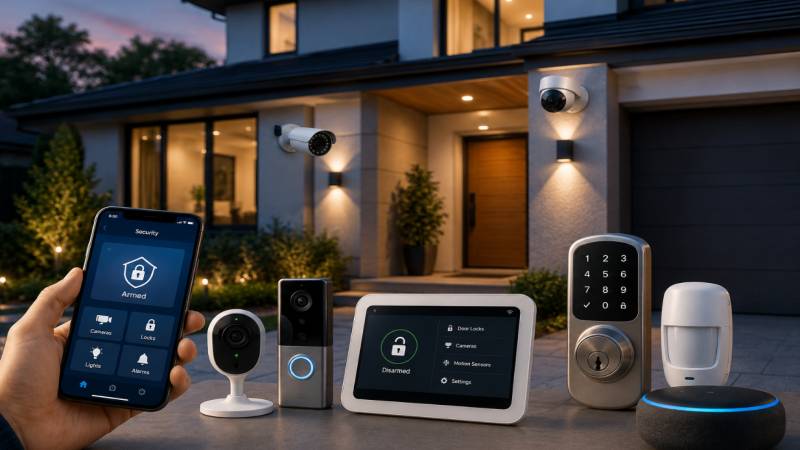
Home security looks a lot different than it did ten years ago. Homeowners can now access tools and features that used to be reserved for businesses with big security budgets.
Below is a practical look at the smart upgrades that actually make a difference, plus a few things worth thinking about before you buy.
Why Smart Security Upgrades Matter
Traditional locks and alarms still get the job done, but they don’t talk to each other. Smart systems change that by connecting your devices so you get a clearer picture of what’s going on at your property, even when you’re not there.
A few things smart setups tend to offer that older systems just can’t:
- Alerts sent straight to your phone as things happen
- The ability to check in on your home from anywhere
- Saved video you can look back on later
- Cameras, locks, and alarms that work together instead of separately
Wireless Security System Camera Options
A wireless security system camera is probably the single most popular upgrade among US homeowners at the moment, and it’s easy to see why.
You skip the drilling and wiring that older CCTV setups required. Most of these cameras connect straight to your Wi Fi, and you can usually have one mounted and running within an hour.
What to Look for in a Camera
Not all wireless cameras perform the same way, so it helps to compare a few things before you buy.
- Resolution. 1080p is a fair baseline for footage that’s actually usable
- Night vision range, since a lot of activity happens after dark
- Field of view, because a wider angle covers more ground
- Storage, whether that’s local, cloud based, or both
- Battery life, if the camera isn’t hardwired into your home
Common Placement Areas
Where you put the camera matters just as much as the camera itself.
- Front door and porch
- Driveway or garage entrance
- Back door and side gates
- Any spot around the house that’s hard to see from inside
Smart Locks and Entry Points
Smart locks either replace your deadbolt or work alongside it. Most allow keyless entry through a code, an app, or a fingerprint scan.
Quite a few models will also ping your phone every time someone comes or goes, which is handy if you want a record of who entered while you were out.
Benefits Homeowners Often Mention
- No more spare key hidden under the mat or a flower pot
- Temporary codes you can give guests or a dog walker
- Auto locking, in case you walk out and forget
- A simple log showing when the door was opened
Home Alarm Systems and Monitoring
Home alarm systems are still the backbone of most security setups, even with all the newer smart gadgets available now. A standard setup pairs motion sensors, door and window sensors, and sometimes glass break detectors with a central panel.
A lot of homeowners pair their alarm system with an alarm monitoring service too. That means someone is watching for alerts around the clock, so even if you miss a notification, help still gets called.
Self Monitored vs Professionally Monitored
Both options come with tradeoffs, and the right one really depends on your routine.
Self monitored systems send you the alert directly, and you decide what to do next. No monthly fee, but it’s on you to respond, day or night.
An alarm monitoring service means a real person on the other end is watching for those alerts. If the alarm goes off, they can reach out to local authorities even if you’re asleep or your phone is on silent.
Motion Sensors and Smart Lighting
Motion activated lighting is one of the cheapest upgrades on this list, and it pairs really well with cameras and alarms. A lit up driveway or entryway makes it a lot harder for someone to approach without being seen.
Indoor motion sensors work the same way, sending an alert if something moves inside while you’re away.
Video Doorbells
Video doorbells have pretty much become standard in a lot of US homes now. They let you see and talk to whoever is at your door without actually opening it, and most save a short clip whenever they’re triggered.
That comes in handy more than people expect, especially with how much everyone orders online these days and leaves packages sitting on the porch.
Putting It All Together
Any one of these devices helps on its own, but they work a lot better as a system.
A fairly typical smart security setup for a US home might look something like this:
- A wireless security system camera at the main entry points
- Smart locks on the front and back doors
- A home alarm system with door and window sensors
- Motion activated lighting outside
- A video doorbell at the main entrance
Most of these can be controlled from one app, which honestly makes daily use a lot simpler than switching between different systems.
FAQs
Do wireless security cameras need internet to work?
Most of them rely on your home Wi Fi to send alerts and back up footage. Some also support an SD card for local storage, so you’re not completely without recording if the internet drops.
Is professional alarm monitoring worth paying for?
That really comes down to your situation. If you want someone watching things even when you can’t check your phone, an alarm monitoring service tends to be worth it for the peace of mind alone.
Can I install smart security devices myself?
In most cases, yes. Wireless cameras, smart locks, and video doorbells are built for do it yourself setup. Wired alarm sensors sometimes go smoother with a professional installer.
How long does a wireless camera battery usually last?
It varies depending on how often it’s triggered, but most battery powered cameras run anywhere from two to six months before needing a charge.
Do smart security systems actually raise home value?
They’re viewed more as a nice extra than a major value booster. Buyers tend to like seeing them, but they’re unlikely to move the needle much on resale price by themselves. See more.